

If you are tired of adding and changing security roles in dataverse manually, there is a simple way to create security groups and people to them with Power Automate.
For this you will need a license for dataverse and a premium license for power automate to use the dataverse connector.
Add a trigger to activate the flow and add some configuration
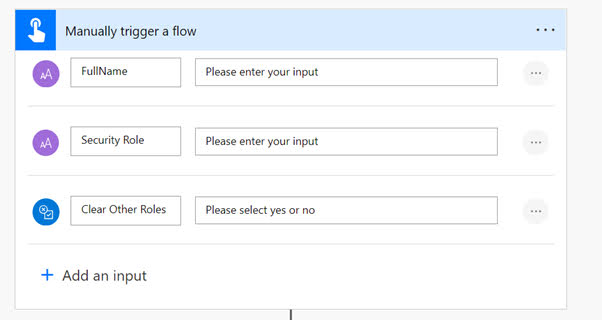
First we are going to add a trigger, this can be a manual trigger or a trigger from a PowerApp if you for example want to use Canvas app to set properties. I also added a extra check “Clear other Roles” if this is true the user will be removed from all previous security groups and after that will be added to the new security group.
Get the necessary tables
Next we are going to get the “users” and “Security Roles” tables from dataverse.

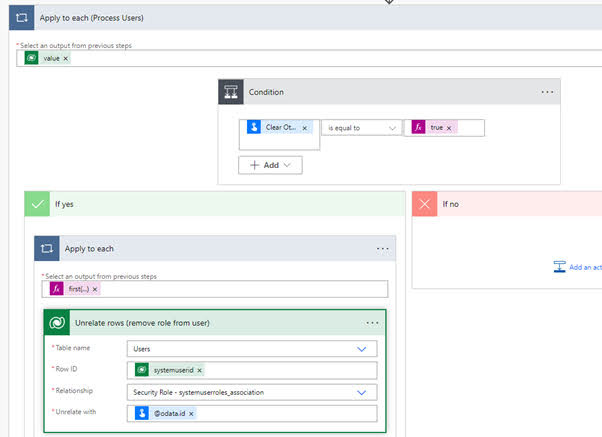
Check previous security roles
Then we are going to check if previous security roles of that user need to be removed and if true we are going remove the roles. “first(outputs(‘List_rows_(Get_User_Id)’)?[‘body/value’])?[‘systemuserroles_association’]”
Add the security roles
Next we are actually going to add the security role to the users. “first(outputs(‘List_rows_(Get_Role_id)’)?[‘body/value’])?[‘@odata.id’]”

 Pauliens Blog
Plaats een reactie