

Creating an app registration
For creating a private Channel in Teams we are going to use the Graph API. To use the Graph API you first need an azure app registration that gives you permission.

The flow
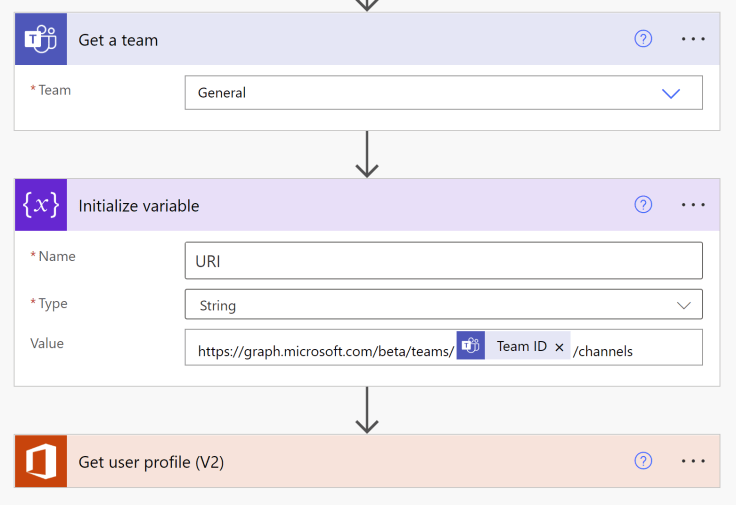
Next we are going to start building the flow. First you need to get the Team where you want to add the channel. Next we are going to build the URI you will be needing to make the graph call for the creation. You need to add an owner to the channel and for this you get use the “Get user profile”. After this we can start building the actual call to the Graph API.
Calling the Graph API
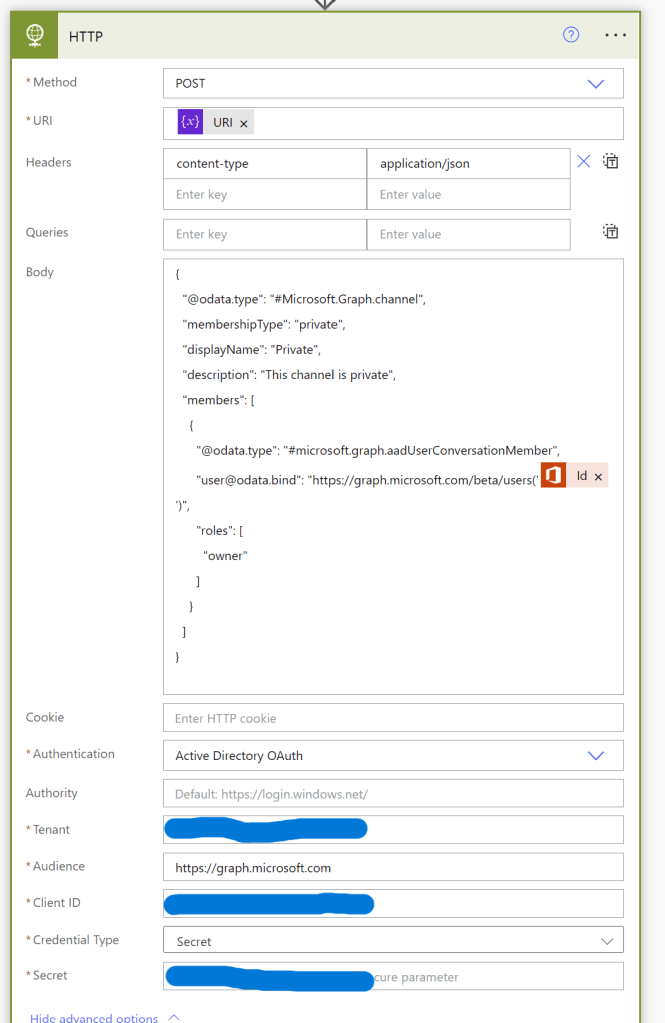
To make a call to the Graph API you need to create a HTTP request. The method will be Post and for the URI I create a variable in the previous steps. “https://graph.microsoft.com/beta/teams/…./channels”.
In the body we set the parameters that the Graph needs to know if the channel is private or not, who the owner of the team will be and the name of the channel.
For authentication I am using the app registration that I created previously.
If you now run the flow it will create a private Teams Channel.
 Pauliens Blog
Plaats een reactie