

Pipeline for a API
If you want to automate the packaging, build and deploy of your API? Then you can follow these steps.
Build pipeline
Go to your project in azure DevOps. On the left side you can click on “pipelines”.
Select “new pipeline” on the top right.
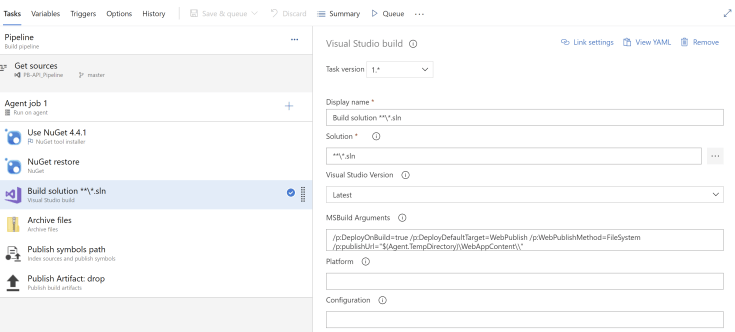
Select “classic editor” and select the repository and branch you want to use. Next we will start adding the steps of the pipeline to build the API.
- use NuGet 4.4.1
- NuGet restore
- Build solution
- Archive files
- Publish symbols path
- Publish Artifacts
Release package
To actually deploy the package to azure your need to create a release. Click on release on the left under pipelines. Select “new release pipeline”.
Click on add an artifact to select which pipeline you want to use for the release.
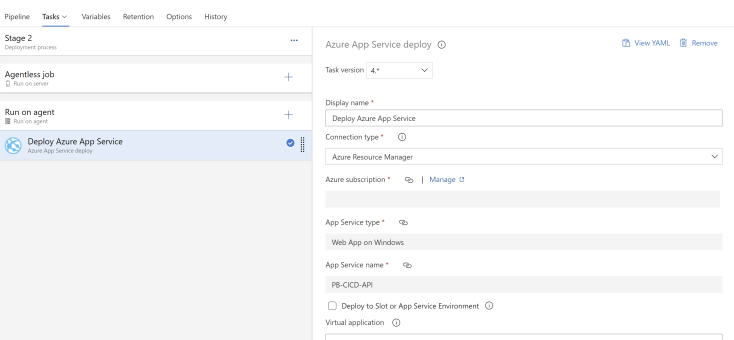
To start adding steps for the actual build click on “add stage”. For this we will use an “empty job”.
Just add the tasks “Deploy Azure App Service” and fill in the necessary parameters and you are ready to go.
For a release you can choose to release it manually or on a specific day and time to fully automate the process.
 Pauliens Blog
Plaats een reactie